Key Takeaways
- Social media accounts usually remain active unless someone takes action.
- Families have the option to memorialize, delete, or leave an account unchanged.
- Each platform has different social media death policies.
- Digital estate planning may make the administration of one’s accounts after death easier.
- Keeping track of online accounts helps preserve the online legacy of a person.
- Complete key account notifications and security steps before making social media changes.
Social media has become an important part of people’s identities, with years of images, stories, messages, and personal updates accumulating across their accounts. Pew Research Center found that 70% of U.S. adults used Facebook and 50% used Instagram in 2024, reflecting how much personal and social history can be stored on these platforms. When someone passes away, however, this digital history does not necessarily disappear, leaving families to decide what should happen to their loved one’s accounts.
A social media death guide can offer information so that your loved ones can decide if you should leave your online accounts active, delete them, or manage them after your death. Every platform has varying protocols, and the decision of which option is best will be based on privacy concerns, family choices, and the wishes of the deceased.
However, social media should not necessarily be the first account-related task families handle after a death. The work completed through important notifications and taking basic security precautions first can help minimize needless risks. Publicly announcing a death or quickly changing social media accounts may alert bad actors that someone is no longer monitoring their accounts. This could make the deceased person’s online information, accounts, property, or even surviving family members a potential target.
This guide addresses why timing is crucial, what Facebook, Instagram, LinkedIn, and X account notifications and security measures should be taken first, and how families can continue to manage these Accounts following the loss of a loved one.
Table of Contents
What Happens to Social Media Accounts When You Die?
Social media accounts are typically left active after someone dies unless a family member or designated individual intervenes. Research from the Oxford Internet Institute projected that at least 1.4 billion Facebook users could die before 2100, highlighting how deceased users’ digital profiles may remain online for decades.
Understanding what happens to social media accounts when you die helps families protect privacy, preserve memories, and decide how they want their loved one’s online presence to continue.
This process is part of the digital estate planning framework that individuals can consider as part of their overall estate planning strategy. Since each platform follows different social media death policies, families typically have three options based on their needs: memorialize, delete, or leave the account unchanged.
Complete Important Account Notifications First
Before memorializing, deleting, or publicly changing social media accounts, complete the important post-death notifications that may affect the person’s financial, government, healthcare, and other accounts. This step becomes useful in providing clarity on matters that have been reported and what still requires attention.
Families might have to alert financial institutions, government organizations, health care providers, insurance companies, and any other organizations that could be of interest. The specific organizations will vary based on the individual’s circumstances and accounts or services provided.
The quick completion of these notifications also provides a chance for families to view account access, pick up key details, and sum up what they need to do right away. This means maintaining a record of notifications, confirmations, and other relevant information in the process.
After completing these very basic account and notification processes, families may consider other opportunities for decision-making about social media.
Why Timing Matters for Social Media Security
The emotional and practical impacts of social media changes are not the only factors worth considering. A public post announcing a death, a sudden account change, or a visible memorialization may signal to people outside the family that the account holder is no longer able to monitor their accounts. The risk is not purely theoretical: the U.S. Government Accountability Office has documented cases in which deceased individuals’ identifying information was used in potentially fraudulent passport applications.
Such information may attract unwanted attention from bad actors seeking opportunities for identity theft, fraud, unauthorized access, or the misuse of personal information and property. For that reason, families may choose to delay public changes until they have completed important account notifications, taken basic security precautions, and addressed other immediate requirements.
This does not mean families should ignore social media indefinitely. Rather, social media accounts should be managed at the appropriate point in the broader post-death process. Families can complete essential notifications and protect sensitive information first, then decide how each social media account should be handled.
Understand the options: Memorialize, Delete, or Leave It
Option 1: Memorialize the Account
Memorialization is a way for families to remember a person without maintaining their online presence in the usual manner. A memorialized account can serve as a place where friends and family share memories and remember the person. Research analyzing 2,533 messages posted on the Facebook profiles of 10 deceased individuals found that posts about processing the death and remembering the deceased were more common soon after the loss, while messages focused on maintaining a connection with the deceased increased over time.
This option may be appropriate when families want to:
- Keep photos, posts, and memories.
- Maintain a tribute page for loved ones.
- Prevent unauthorized changes to the account.
For Facebook users, families may want to learn how to memorialize a Facebook account and understand the role of a Facebook legacy contact. A legacy contact is designated by the user to manage specific parts of a memorialized account based on the permissions available.
Option 2: Delete the Account

Some families prefer to permanently remove a deceased person’s social media accounts. In cases where privacy, security, or closure are paramount, deletion might be a good option.
Families should think about saving the important photos, messages, or memories prior to deleting an account. Once an account is removed, recovering the information may not be possible.
Common requests include:
- Deleting Instagram accounts of deceased individuals.
- Reporting a deceased user’s Instagram profile.
- Requesting LinkedIn deceased member removal.
- Managing an X Twitter account of a deceased person.
Information or verification may be required on each platform prior to making a removal request.
Option 3: Leave the Account As Is
After a death, some families do not make any immediate changes. Keeping an account dormant can provide family members with time to make their own decisions.
However, inactive accounts may create concerns, including:
- Unwanted notifications or interactions.
- Unchanged personal data remaining on the web.
- A higher risk of privacy and security issues.
When the time is right for a family to make decisions, understanding the facts and what options are available will help them review the situation and make an informed decision.
Facebook After Death
Facebook provides options for managing a deceased person’s account, including memorialization or permanent deletion. Users can also choose a legacy contact in advance to manage certain aspects of their profile if it is memorialized. A legacy contact can write a pinned post, respond to new friend requests, update the profile or cover photo, download a copy of information the user has permitted, and delete the memorialized account.
However, A legacy contact cannot log in to the deceased person’s account, read private messages, remove or edit past posts, or remove friends. If no legacy contact was designated, a memorialized account cannot be changed, although eligible individuals can still request memorialization or account removal through Facebook’s procedures.
Memorialization preserves the profile and content that the deceased person shared, while deletion permanently removes the profile, photos, posts, videos, and other content from the account. Because deleted content cannot be retrieved, families should consider the person’s wishes and whether important information should be preserved before requesting removal.
Families should also consider the timing of any public Facebook changes. If important notifications and security steps have not yet been completed, waiting before publicly memorializing or changing the account may help avoid drawing unnecessary attention to the death.
Instagram After Death

After someone passes away, Instagram allows eligible individuals to request that the account be memorialized or removed. A memorialized account remains visible with the existing photos and posts, while removal permanently deletes the account. Requests may require information that helps Instagram verify the person’s death and the requester’s relationship or authority.
Family members cannot simply use the deceased person’s login credentials to take over the account, and memorialization does not provide access to private messages. Before requesting removal, families should therefore consider whether photographs, posts, or other content should be preserved, as deletion can make the account and its content unavailable.
As with other social platforms, families should also consider completing important notifications and basic security measures before making a public change to an Instagram account. A deliberate approach can help protect personal information while giving the family time to decide how the account should be handled.
LinkedIn After Death
LinkedIn profiles often include professional details such as work history, achievements, recommendations, and connections. After someone passes away, LinkedIn offers two options: memorializing the profile or closing the account. If someone has authority to act on behalf of the deceased, they can request account closure; without that authority, they can report the death, and LinkedIn can memorialize the profile.
Requests require information such as the deceased member’s full name, profile URL, and the requester’s relationship to them. Account-closure requests also require a death certificate and documentation establishing the requester’s legal authority, such as letters of administration or testamentary documents. LinkedIn does not provide usernames or passwords to family members, and access to a memorialized account remains locked.
A memorialized profile can retain professional information, including posts, recommendations, skills, endorsements, experience, education, and connections, while certain interactions and notifications are disabled. Families should therefore consider whether preserving the person’s professional legacy is preferable to permanently closing the account before submitting a request.
X (Twitter) After Death
An X account belonging to a deceased person may remain active unless X receives a request for deactivation. X can work with an authorized person acting on behalf of the estate or a verified immediate family member to deactivate the account. The requester may need to provide information about the deceased, identification, and a copy of the death certificate. X does not provide account access to family members or other representatives.
X also has an inactive account policy, under which accounts that remain unused for an extended period may eventually be removed. This is separate from the formal process for reporting a deceased user and should not be relied on as a way to manage a deceased person’s account.
Because X accounts can contain public posts, photographs, and private conversations, families should consider whether important information needs to be preserved before requesting deactivation. Completing essential notifications and security steps first can also help prevent a sudden public account change from revealing the death before other administrative matters have been addressed.
Choosing the Right Option for a Deceased Account
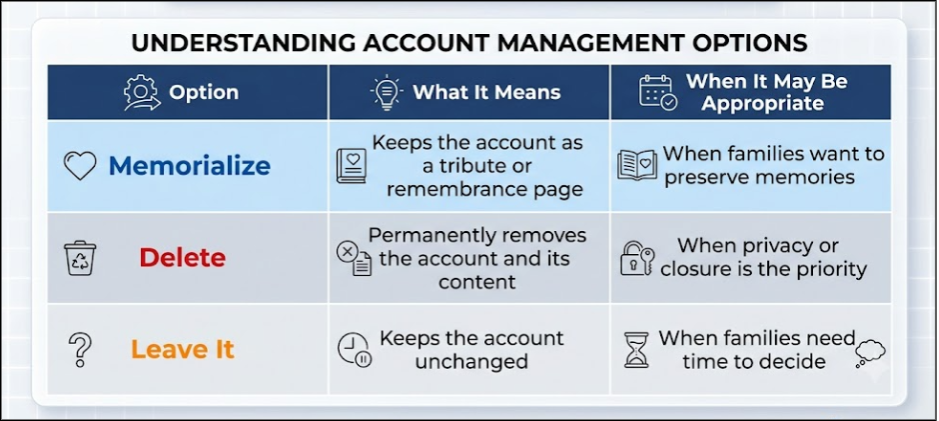
Choosing whether to memorialize, delete, or leave an account unchanged depends on the person’s wishes and the family’s needs.
Timing should also be part of that decision. Before making a visible change, consider whether important post-death notifications have been completed and whether sensitive accounts and information have been secured.
Consider:
- Did the person leave account instructions?
- Do loved ones want to preserve memories?
- Are there privacy or security concerns?
- Does the account contain important information?
The best choice may vary by platform. For example, a family may memorialize Facebook while removing a LinkedIn profile.
Managing Your Digital Legacy After Death
A person’s online presence can remain active after their passing. Digital estate planning helps families manage accounts by organizing important information, preferences, and access instructions.
This may include:
- Creating a list of important accounts.
- Recording account preferences.
- Choosing trusted individuals to manage digital assets.
- Reviewing privacy settings.
Planning ahead helps ensure a person’s digital legacy after death reflects their wishes and makes account management easier for loved ones.
Complete the Process with Confidence
Understanding what happens to social media accounts when you die is only one part of managing a person’s digital affairs. The sequence of events in these responsibilities can also be important. Completing important account notifications and addressing security concerns before making public social media changes can help reduce unnecessary exposure.
After these basic activities are completed, families can either memorialize, delete, or take no action on each account. Taking time to review each platform’s options can help protect privacy while preserving the memories and online legacy that matter most.
Need help managing post-death notifications and digital accounts?
Final Closures helps simplify the process through our Full-Service Comprehensive package, providing support for both digital and administrative post-death tasks.
Frequently Asked Questions
1. What happens to social media accounts when someone dies?
Social media accounts usually remain active until someone requests memorialization, deletion, or another available option.
2. Should I memorialize or delete a deceased person’s Facebook account?
Memorialization preserves memories, while deletion permanently removes the account.
3. What is a Facebook legacy contact?
A Facebook legacy contact is a person authorized to manage certain features of a memorialized account.
4. Can I delete a deceased person’s Instagram?
Yes, eligible individuals can request the removal of a deceased person’s Instagram account.
5. How do I remove a deceased person’s LinkedIn profile?
You can request LinkedIn deceased member removal by submitting the required information through LinkedIn.
6. How do I deactivate a deceased person’s X account?
An authorized representative or verified immediate family member can request deactivation through X’s account-support process.
7. Can family members access a deceased person’s social media messages?
Family members generally cannot access private messages without authorized access or platform approval.